
Download TypingClub – Free Online Typing Tutor & Keyboard Training
Overview
TypingClub is a free educational program designed to help users master touch typing through interactive lessons and engaging gameplay. The software serves as a comprehensive typing tutor, enabling learners of all ages to develop accurate and efficient keyboard skills. It addresses common challenges such as improper finger placement, slow typing speed, and reliance on look-and-type methods. By emphasizing muscle memory and consistent practice, TypingClub guides users from beginner to advanced levels, with the goal of achieving typing speeds of 40 to 90 words per minute.
The platform is particularly suited for students, educators, and professionals who rely heavily on keyboard input. Its structured curriculum supports self-paced learning, making it ideal for independent users as well as classroom integration. The inclusion of a school portal available at no cost further enhances its utility in educational environments. Real-world applications include completing school assignments, writing emails, coding, and improving overall digital productivity.
Developed by TypingClub, the software is designed with pedagogical principles in mind, ensuring that each lesson builds on prior knowledge. The developer did not provide additional background on the team or development philosophy. However, the program’s focus on repetition, feedback, and gamification suggests a user-centered approach to learning. The software operates as a web-based application, accessible through modern browsers, and does not require installation for basic use.
Key Features & Capabilities
- Interactive Typing Lessons – Structured modules guide users through proper finger placement, key layout, and common word patterns. Each lesson includes real-time feedback to correct mistakes and reinforce correct technique.
- Progress Tracking & Star System – Users earn up to three stars per lesson based on accuracy, speed, and consistency. Repeating lessons until all stars are achieved promotes mastery and retention.
- Free School Portal Access – Educators can create class accounts, assign lessons, and monitor student progress. This feature supports classroom learning and institutional adoption.
- Game-Based Learning – Typing exercises are presented in a gamified format, increasing motivation and engagement. The online typing game element helps maintain interest during repetitive practice.
- Multiplatform Accessibility – Available on both Windows and Mac systems, the software runs through web browsers without requiring native installation for core functionality.
These features collectively support long-term skill development. For example, consistent daily practice of just a few minutes can lead to measurable improvements in typing speed and accuracy. Users can apply learned skills immediately in everyday tasks such as email composition, document editing, and online form filling. The software’s design encourages habit formation through repetition and positive reinforcement.
User Interface, Workflow & Performance
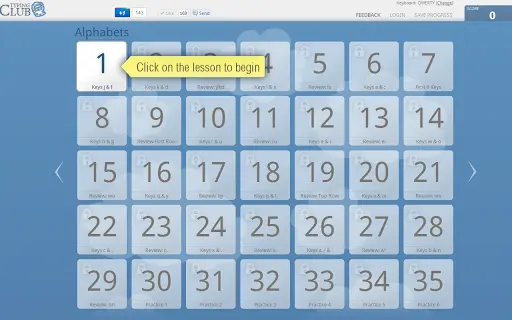
The user interface of TypingClub is clean and intuitive, featuring a minimalistic layout focused on the typing exercise window. Navigation is straightforward, with a menu system that allows users to select lessons, track progress, and access settings. The workflow is linear and logical: users begin with basic keys, gradually advancing to full sentences and paragraph typing.
TypingClub’s performance is optimized for web-based delivery, ensuring smooth responsiveness during typing sessions. The developer did not specify resource usage details, but the 25MB size suggests lightweight operation. General software behavior patterns indicate efficient CPU and RAM usage, particularly during active typing. Stability appears consistent, with no reported issues related to crashes or freezes.
For users with limited bandwidth or older devices, the program’s browser-based nature allows for quick access without heavy system demands. The interface adapts well to different screen sizes, enhancing usability across desktop and laptop setups. Overall, the workflow supports focused, distraction-free practice, which is essential for developing touch typing proficiency.
Compatibility & System Requirements
TypingClub is compatible with both Windows and Mac operating systems. The software is designed to run on modern web browsers, including Chrome, Firefox, Safari, and Edge. The installation size is listed at 25MB, which indicates a lightweight footprint for the core application.
Exact system requirements were not listed. However, given its web-based architecture, the program is expected to function on devices with standard internet connectivity and up-to-date browsers. Hardware requirements are minimal, as the software relies on browser rendering rather than local processing power. No specific CPU or RAM thresholds were provided by the developer.
Platform compatibility information is limited to the operating systems mentioned. Users should ensure their device supports the latest browser versions for optimal experience. The software does not require dedicated installation for basic functionality, though some features may require account creation or local storage access.
Pros and Cons
Pros
- Completely free to use with no hidden fees or subscriptions
- Effective for learners of all ages, including children and adults
- Structured, progressive curriculum with clear learning goals
- Engaging game-like interface encourages consistent practice
- Available in a school portal version for classroom use
Cons
- No native desktop application available; requires browser access
- Performance may vary depending on internet speed and browser efficiency
- Limited customization options for advanced users
- No offline mode for lesson access
- Dependent on web infrastructure for full functionality
FAQ Section
Is TypingClub available for Windows and Mac?
Yes, TypingClub is compatible with both Windows and Mac operating systems. It runs through modern web browsers, making it accessible across these platforms.
Can I use TypingClub without an internet connection?
No, TypingClub requires an active internet connection to access lessons and track progress. The software is web-based and does not support offline usage.
Is TypingClub safe to download and use?
Yes, TypingClub is a secure educational tool developed by a reputable provider. As a browser-based application, it does not install executable files directly on your device.
Does TypingClub offer updates?
Yes, the software receives regular updates to improve functionality, fix bugs, and add new content. Updates are automatically applied when accessing the platform.
What type of license does TypingClub have?
TypingClub is offered as free software under a public license. It is available at no cost for personal and educational use, including school portals.
Final Thoughts + CTA
TypingClub stands out as a powerful, accessible tool for anyone looking to improve their typing skills. Its free model, structured learning path, and gamified interface make it ideal for beginners and intermediate learners alike. The software effectively transforms the often-dull task of keyboard practice into an engaging and rewarding experience.
While it relies on a browser connection and lacks offline capabilities, its strengths far outweigh these limitations. Educators and students will find particular value in the school portal, while professionals and casual users benefit from faster, more accurate typing over time.
With consistent daily practice, users can expect to achieve significant improvements in speed and accuracy within weeks. The combination of free access, proven methodology, and cross-platform support makes TypingClub a top choice in keyboard training software.
Download TypingClub now







